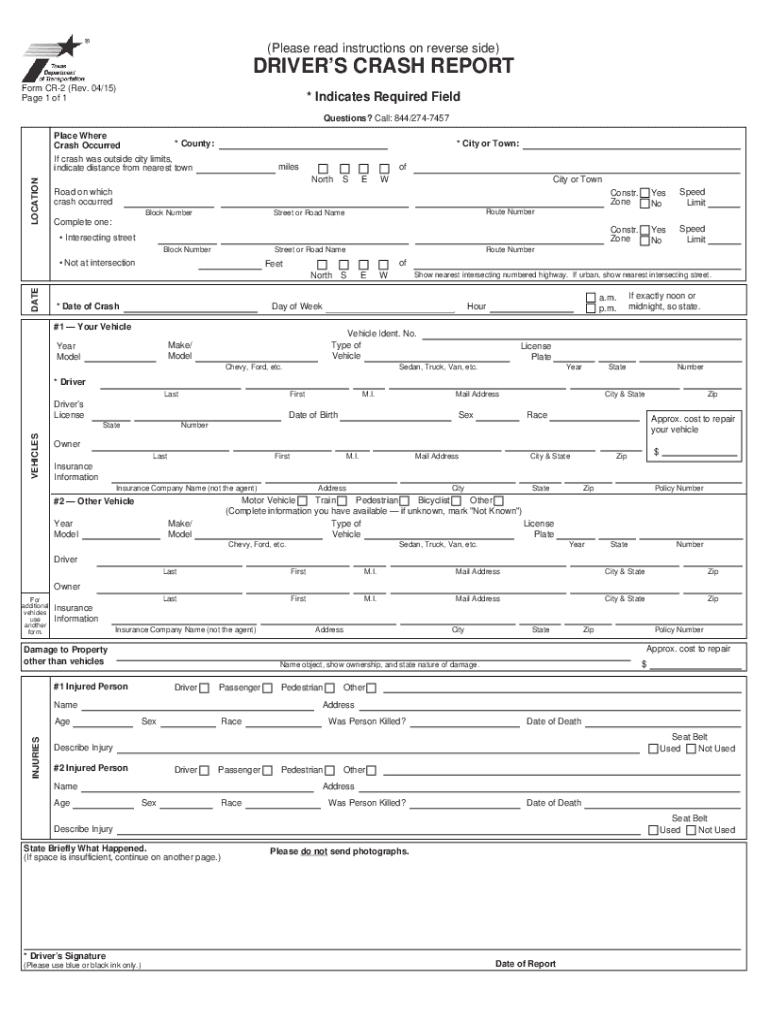
Texas Blue Form 2015


What is the Texas Blue Form
The Texas Blue Form, officially known as the Driver’s Crash Report, is a document required for individuals involved in a motor vehicle accident in Texas. This form is essential when a police officer does not investigate or document the incident. It serves as a formal record of the accident and is crucial for insurance claims and legal proceedings. The form must be submitted to the Texas Department of Transportation (TxDOT) within ten days of the accident, especially if property damage exceeds one thousand dollars or if injuries occurred.
Steps to Complete the Texas Blue Form
Completing the Texas Blue Form involves several straightforward steps. Begin by gathering necessary information, including details about the accident, vehicles involved, and any injuries. The following details should be included:
- The date, time, and location of the accident
- Names and contact information of all parties involved
- Insurance details for each vehicle
- A description of the accident and any contributing factors
Once all information is collected, fill out the form accurately. Providing detailed and clear information helps clarify the circumstances of the accident for all parties involved.
How to Obtain the Texas Blue Form
The Texas Blue Form can be obtained through various means. It is available online as a downloadable PDF from the Texas Department of Transportation website. Additionally, physical copies can often be found at local law enforcement agencies or the TxDOT offices. It is important to ensure you have the most current version of the form to avoid any issues during submission.
Legal Use of the Texas Blue Form
The Texas Blue Form is legally recognized as a formal document that provides essential details about a traffic accident. It is used by insurance companies, legal entities, and law enforcement to assess liability and damages. Accurate completion of the form is vital, as any discrepancies may lead to complications in insurance claims or legal proceedings.
Key Elements of the Texas Blue Form
Several key elements must be included in the Texas Blue Form to ensure it is complete and valid. These elements include:
- Accident details: date, time, and location
- Involved parties: names, addresses, and insurance information
- Vehicle information: make, model, and year of each vehicle
- Witness information: names and contact details of any witnesses
Including all these elements helps create a comprehensive report that accurately reflects the events of the accident.
Form Submission Methods
The Texas Blue Form can be submitted in several ways. Individuals may choose to file the form electronically through the TxDOT website, which offers a streamlined process for submission. Alternatively, the completed form can be mailed to the appropriate TxDOT office or submitted in person at local offices. Each method has its own advantages, so individuals should choose the one that best fits their needs.
Quick guide on how to complete blue form texas 2015 2018
Simplify your life by completing the Texas Blue Form with airSlate SignNow
Whether you need to title a new vehicle, apply for a driver’s permit, transfer ownership, or perform any other task related to automobiles, handling RMV documents such as Texas Blue Form is an inevitable inconvenience.
There are multiple methods available to obtain them: via mail, at the RMV service center, or online through your local RMV website to print them out. Each of these options can be time-consuming. If you are looking for a faster way to fill them out and validate them with a legally-recognized signature, airSlate SignNow is your optimal choice.
How to easily complete Texas Blue Form
- Click Show details to view a brief description of the document of interest.
- Select Get document to initiate and access the form.
- Follow the green indicator directing you to the mandatory fields if applicable.
- Utilize the top toolbar and take advantage of our professional features to modify, annotate, and enhance your form.
- Add text, your initials, shapes, images, and other elements.
- Click Sign in on the same toolbar to create a legally-recognized signature.
- Review the form content to ensure it is free of errors and inconsistencies.
- Click Done to complete the form.
Using our service to fill out your Texas Blue Form and other related documents will save you a considerable amount of time and frustration. Enhance your RMV document processing task right from the start!
Create this form in 5 minutes or less
Find and fill out the correct blue form texas 2015 2018
FAQs
-
How can I fill out the FY 2015-16 and 2016-17 ITR forms after the 31st of March 2018?
As you know the last date of filling income tax retruns has been gone for the financial year 2015–16 and 2016–17. and if you haven’t done it before 31–03–2018. then i don’t think it is possible according to the current guidlines of IT Department. it may possible that they can send you the notice to answer for not filling the retrun and they may charge penalty alsoif your income was less than taxable limit then its ok it is a valid reson but you don’t need file ITR for those years but if your income was more than the limit then, i think you have to write the lette to your assessing officer with a genuine reason that why didn’t you file the ITR.This was only suggestion not adviceyou can also go through the professional chartered accountant
-
How do I fill out the IIFT 2018 application form?
Hi!IIFT MBA (IB) Application Form 2018 – The last date to submit the Application Form of IIFT 2018 has been extended. As per the initial notice, the last date to submit the application form was September 08, 2017. However, now the candidates may submit it untill September 15, 2017. The exam date for IIFT 2018 has also been shifted to December 03, 2017. The candidates will only be issued the admit card, if they will submit IIFT application form and fee in the prescribed format. Before filling the IIFT application form, the candidates must check the eligibility criteria because ineligible candidates will not be granted admission. The application fee for candidates is Rs. 1550, however, the candidates belonging to SC/STPWD category only need to pay Rs. 775. Check procedure to submit IIFT Application Form 2018, fee details and more information from the article below.Latest – Last date to submit IIFT application form extended until September 15, 2017.IIFT 2018 Application FormThe application form of IIFT MBA 2018 has only be released online, on http://tedu.iift.ac.in. The candidates must submit it before the laps of the deadline, which can be checked from the table below.Application form released onJuly 25, 2017Last date to submit Application form(for national candidates)September 08, 2017 September 15, 2017Last date to submit the application form(by Foreign National and NRI)February 15, 2018IIFT MBA IB entrance exam will be held onNovember 26, 2017 December 03, 2017IIFT 2018 Application FeeThe candidates should take note of the application fee before submitting the application form. The fee amount is as given below and along with it, the medium to submit the fee are also mentioned.Fee amount for IIFT 2018 Application Form is as given below:General/OBC candidatesRs 1550SC/ST/PH candidatesRs 775Foreign National/NRI/Children of NRI candidatesUS$ 80 (INR Rs. 4500)The medium to submit the application fee of IIFT 2018 is as below:Credit CardsDebit Cards (VISA/Master)Demand Draft (DD)Candidates who will submit the application fee via Demand Draft will be required to submit a DD, in favour of Indian Institute of Foreign Trade, payable at New Delhi.Procedure to Submit IIFT MBA Application Form 2018Thank you & Have a nice day! :)
-
How do I fill out the CAT 2018 application form?
The procedure for filling up the CAT Application form is very simple. I’ll try to explain it to you in simple words.I have provided a link below for CAT registration.See, first you have to register, then fill in details in the application form, upload images, pay the registration fee and finally submit the form.Now, to register online, you have to enter details such as your name, date of birth, email id, mobile number and choose your country. You must and must enter your own personal email id and mobile number, as you will receive latest updates on CAT exam through email and SMS only.Submit the registration details, after which an OTP will be sent to the registered email id and mobile number.Once the registration part is over, you will get the Login credentials.Next, you need to fill in your personal details, academic details, work experience details, etc.Upload scanned images of your photograph, and signature as per the specifications.Pay the registration fee, which is Rs. 950 for SC/ST/PWD category candidates and Rs. 1900 for all other categories by online mode (Credit Card/ Debit Card/ Net Banking).Final step - Submit the form and do not forget to take the print out of the application form. if not print out then atleast save it somewhere.CAT 2018 Registration (Started): Date, Fees, CAT 2018 Online Application iimcat.ac.in
-
How do I fill out the NTSE form 2017- 2018 Jharkhand online?
You cannot gove NTSE online or at your own level you have to belong to a school which is conducting ntse. Then download the form online from the page of ntse, fill it and submit it to your school along with fee. If your school is not conducting ntse, sorry to say but you cannot give ntse. It can only be given through, no institutions are allowed to conduct thos exam.
Create this form in 5 minutes!
How to create an eSignature for the blue form texas 2015 2018
How to generate an electronic signature for the Blue Form Texas 2015 2018 in the online mode
How to make an electronic signature for your Blue Form Texas 2015 2018 in Google Chrome
How to generate an electronic signature for putting it on the Blue Form Texas 2015 2018 in Gmail
How to create an eSignature for the Blue Form Texas 2015 2018 straight from your mobile device
How to make an eSignature for the Blue Form Texas 2015 2018 on iOS devices
How to create an eSignature for the Blue Form Texas 2015 2018 on Android OS
People also ask
-
What is the Texas Blue Form and how can it be used with airSlate SignNow?
The Texas Blue Form is a standardized document used in Texas for various legal and business transactions. With airSlate SignNow, you can easily upload, eSign, and manage your Texas Blue Form digitally, streamlining the process and ensuring compliance.
-
How much does it cost to use airSlate SignNow for managing the Texas Blue Form?
airSlate SignNow offers a variety of pricing plans that cater to different business needs. You can choose a plan that suits your volume of Texas Blue Form transactions, ensuring you get a cost-effective solution for your document management.
-
What features does airSlate SignNow offer for the Texas Blue Form?
airSlate SignNow includes features such as customizable templates, automated workflows, and secure eSigning specifically for the Texas Blue Form. These features make it easy to create, send, and track your documents efficiently.
-
How does airSlate SignNow ensure the security of the Texas Blue Form?
AirSlate SignNow prioritizes security by offering advanced encryption and compliance with industry standards for the Texas Blue Form. Your documents are protected, ensuring that sensitive information remains confidential throughout the signing process.
-
Can I integrate airSlate SignNow with other applications for the Texas Blue Form?
Yes, airSlate SignNow offers seamless integrations with various applications like Google Drive, Salesforce, and more. This allows you to manage the Texas Blue Form alongside other business tools, enhancing your workflow.
-
What are the benefits of using airSlate SignNow for the Texas Blue Form?
Using airSlate SignNow for the Texas Blue Form provides benefits such as reduced turnaround time, improved accuracy, and enhanced collaboration. This efficient eSigning solution helps businesses save time and resources.
-
Is it easy to get started with airSlate SignNow for the Texas Blue Form?
Absolutely! Getting started with airSlate SignNow for the Texas Blue Form is quick and easy. Simply sign up, upload your document, and begin sending it for eSignature in just a few clicks.
Get more for Texas Blue Form
Find out other Texas Blue Form
- How To Sign Ohio Government Form
- Help Me With Sign Washington Government Presentation
- How To Sign Maine Healthcare / Medical PPT
- How Do I Sign Nebraska Healthcare / Medical Word
- How Do I Sign Washington Healthcare / Medical Word
- How Can I Sign Indiana High Tech PDF
- How To Sign Oregon High Tech Document
- How Do I Sign California Insurance PDF
- Help Me With Sign Wyoming High Tech Presentation
- How Do I Sign Florida Insurance PPT
- How To Sign Indiana Insurance Document
- Can I Sign Illinois Lawers Form
- How To Sign Indiana Lawers Document
- How To Sign Michigan Lawers Document
- How To Sign New Jersey Lawers PPT
- How Do I Sign Arkansas Legal Document
- How Can I Sign Connecticut Legal Document
- How Can I Sign Indiana Legal Form
- Can I Sign Iowa Legal Document
- How Can I Sign Nebraska Legal Document